As an Amazon Associate this site earns from qualifying purchases.
Quick Picks
These are the label rolls referenced in this guide. All three are direct thermal stock, which is what you need for a printer that uses no ribbon.
| Label roll | Size and count | Best for | Link |
|---|---|---|---|
| Starziwen 500 Labels/Roll 2" White Round Thermal Labels | 2" round, 500 labels per roll | Testing a print head with maximum contrast | Check Price on Amazon |
| Starziwen 500 Labels/Roll 2" Gradient Brown Round Thermal Labels | 2" round, 500 labels per roll | Branded packaging stickers, not diagnostics | Check Price on Amazon |
| Thermal Labels,2 Inch Kraft Paper Color Round Thermal Printer Stickers | 2 inch round, 500 per roll | Kraft-look thank-you and name tag labels | Check Price on Amazon |
Disclosure: We earn a small commission from qualifying Amazon purchases at no extra cost to you.
As an Amazon Associate we earn from qualifying purchases. This page contains affiliate links, and we may receive a commission if you buy through them — at no extra cost to you.
As an Amazon Associate, we earn from qualifying purchases.
Last Updated: September 2026
If your thermal label printer is printing blank labels, the roll is almost certainly loaded upside down. Direct thermal printers have no ink and no toner — the print head applies heat, and only the coated side of the label darkens. Flip a roll and the head heats the uncoated paper back, which does nothing at all. Feeds fine, sounds fine, comes out white.
That single cause covers most blank-label complaints. Faded print is a different animal: it usually means a dirty print head, a low darkness/density setting, or label stock the printer's heat profile was never tuned for. Below is the order to check things in, from the fix that takes ten seconds to the one that takes ten minutes.
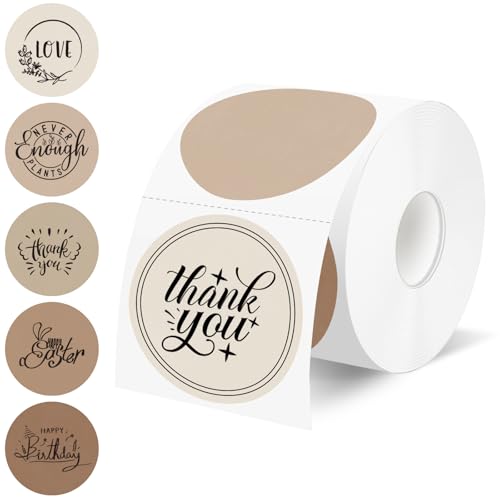
- 500 Gradient Brown Labels Per Roll: Each roll contains 500 counts of 2" diameter thermal labels featuring a warm gradient sequence from cream beige to deep mocha, offering 5
- Strong Adhesive: Featuring a reliable commercial-grade adhesive, these circle stickers bond firmly to coffee cups, paper bags, glass jars, and cardboard boxes, ensuring your brand
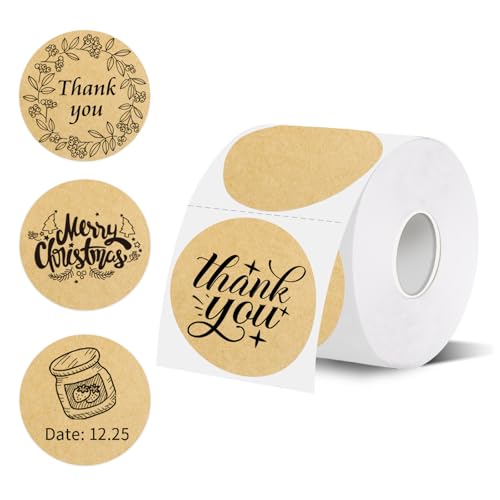
- HIGH QUALITY: Thermal label stickers are made of high-quality material, waterproof, oil-proof, durable, easy to peel off, high viscosity allows them to stay firmly in place, this
- HIGH QUALITY PRINTING: Our thermal label paper produces clear and crisp prints, making it easy to read and scan, can be permanently adhered to any surface, is waterproof and
The Problem: No Ink Means Nothing to Blame but Heat, Coating and Contact
Here's the thing about direct thermal printing. There are only three variables. Heat from the print head. A heat-sensitive coating on the label. And clean physical contact between the two.
Blank output means one of those three is missing entirely — nearly always the coating, because the roll is reversed. Faded output means one of them is degraded: not enough heat, a partially blocked head, or a coating that isn't responding the way the printer expects.
That framing matters because it tells you what not to do. Do not reinstall drivers first. Do not buy a new printer. Do not assume a Brother QL-800 or a DYMO LabelWriter has failed because a page came out white.
Step-by-Step Solution
1. Do the fingernail test (10 seconds)
Drag your thumbnail firmly across the face of a blank label. Press hard and move fast — friction generates heat. If a grey or black scratch line appears, that side is the thermal-coated side and it works. If nothing appears, you just scratched the back of the label.
This one test separates "the roll is upside down" from "the printer has a problem." Do it before anything else.
2. Confirm which way the coating faces the head
On most desktop direct thermal printers the print head sits above the paper path, so the coated side must face up. On rolls where labels are wound face-in, that means the roll feeds from underneath rather than over the top.
If your fingernail test marked the side that is currently facing down, flip the roll. That is the direct thermal label wrong side loaded fault, and it is the single most common cause of blank labels.
3. Re-seat the roll and close the latch until it clicks
A roll that sits slightly off the guides can feed without ever making full contact with the head. Snug the roll guides against the label edges without pinching hard enough to bind the roll. Then close the printer lid until both latches click. A half-latched lid gives you light, patchy print that looks exactly like a dying print head.
4. Run the printer's own self-test
Every mainstream label printer has a power-on feed or self-test routine that prints a pattern directly from firmware. If the self-test prints cleanly and your computer's output is blank, the fault is in the driver, the label size selection, or the application — not the hardware. If the self-test is also blank or faded, keep going down this list.
5. Clean the thermal print head
Adhesive residue, paper dust and label glue build up on the head and block heat transfer. That is what produces vertical white streaks, or overall grey-looking print that used to be crisp.
- Power the printer off and unplug it.
- Open the lid and let the head cool for a couple of minutes.
- Wipe the thin ceramic strip with a 99% isopropyl alcohol swab or a dedicated cleaning pen, moving along the strip end to end.
- Let it dry completely before closing the lid.
- Reprint. If streaks persist in exactly the same columns, individual heating elements may have failed — that is a hardware issue, not a cleaning one.
6. Raise the darkness/density setting
In the driver or the printer's utility, darkness (sometimes called density or heat) controls how much energy each element gets. Bumping it up two or three notches fixes most faded output, especially with kraft or coloured stock where the contrast starts lower to begin with. Push it too high and you get bleed, smearing and shortened head life — go up gradually.
7. Rule out the label stock
If everything above checks out and print is still weak, swap in a fresh roll from a different batch. Old stock that has been sitting in heat, sunlight or a hot car can lose sensitivity. Thermal paper is designed to darken with heat, which is exactly why storing it badly ruins it.
Tools and Products You'll Need
You need three things: 99% isopropyl alcohol swabs or a thermal head cleaning pen, a lint-free cloth, and a known-good roll of direct thermal labels to test against. That last one matters more than people expect — you cannot diagnose a print head using a roll you already suspect.
Recommended Products
For a clean diagnostic baseline, use white stock. White gives you the highest possible contrast between the darkened coating and the background, so a faint or streaky result is unmistakable rather than ambiguous. The Starziwen 500 Labels/Roll 2" White Round Thermal Labels listing describes 2" white round waterproof thermal stickers at 500 labels per roll, compatible with direct thermal label printers [S3]. Five hundred labels on a roll means you can burn a few on test prints without feeling it.
The trade-off: it is 2" round only. If your problem is with 4x6 shipping labels, this roll will not reproduce your exact setup, and round die-cuts on a printer configured for a rectangular label size will throw their own alignment errors.
For finished packaging rather than troubleshooting. The Starziwen 500 Labels/Roll 2" Gradient Brown Round Thermal Labels listing describes a gradient brown 2" round waterproof thermal sticker, 500 per roll, aimed at DIY logo designs and small business thank-you labels [S4]. Coloured stock is the wrong choice for diagnosing faded print — you are deliberately lowering contrast on the exact symptom you are trying to read. Use it once the printer is behaving.
A kraft-look alternative in the same size. The Thermal Labels,2 Inch Kraft Paper Color Round Thermal Printer Stickers listing describes self-adhesive 2 inch round direct thermal labels at 500 per roll for DIY logo and name tag use [S5]. Same caveat as the brown: darker base stock, less visible contrast, and this listing does not describe the labels as waterproof the way the two Starziwen listings do [S5][S3][S4].
Honestly, for a printer that is currently misbehaving, white is the only sensible test stock. Buy the colours for the finished product.
Tips for Best Results
- Store rolls in a sealed bag, away from heat and direct sun. Thermal coating reacts to heat by design.
- Clean the print head every time you change a roll. It takes fifteen seconds and prevents the slow fade that people mistake for printer failure.
- Keep one roll of known-good white stock aside purely as a control.
- Match the label size in the driver to the physical label. A 2" round label on a driver set to 4x6 will produce partial or apparently blank output.
- Avoid hand sanitiser as a substitute for isopropyl alcohol. It contains glycerin and additives that leave a film.
Common Mistakes to Avoid
Buying a new printer after one blank page. Blank output is a loading fault far more often than a hardware fault.
Assuming a ribbon is missing. Direct thermal printers do not use ribbons. If your model takes one, it is a thermal transfer printer and the diagnosis is different.
Cranking darkness to maximum immediately. Excess heat smears output and stresses the head. Step up gradually.
Cleaning a hot head. Let it cool. Alcohol on a hot ceramic strip evaporates before it lifts anything.
Testing on coloured stock. You cannot judge faintness against a brown background.
How We Research
This site does no product research, and every page says so. For this guide we read the Amazon Creators API verified product records for each of the three label rolls named above, retrieved 2026-09-05, and worked from what those records actually state: product title, size, label count per roll, and stated compatibility with direct thermal printers. The Creators API records for these three ASINs supply titles only — no manufacturer price, rating, rating count, coating sensitivity grade, adhesive type or shelf-life figure is published in them, so none of those are asserted here.
The troubleshooting steps come from how direct thermal printing works as a process, not from any product claim.
Final Verdict
Start with the fingernail test. It resolves the majority of blank-label cases in ten seconds, costs nothing, and tells you immediately whether to flip the roll or start cleaning.
On stock: if you are diagnosing a printer, the Starziwen 500 Labels/Roll 2" White Round Thermal Labels is the one to reach for, because the listing's white 2" round direct thermal specification gives you the highest-contrast surface of the three for judging whether print is faint [S3] — and 500 labels per roll leaves plenty of room for test pages [S3]. The gradient brown and kraft rolls are for finished packaging, not diagnostics.
All three are 2" round, 500-count direct thermal rolls [S3][S4][S5]. None of them will help you if your actual problem is a 4x6 shipping label — check your size before ordering.
Related Resources
- Direct thermal vs thermal transfer printers explained
- How to choose the right label size for your printer
- Thermal label storage and shelf life
- CPSC consumer product safety information: cpsc.gov [S1]
- USA.gov consumer protection resources: usa.gov [S2]
Frequently Asked Questions
How do I know which side of a thermal label is the printable side? Scratch the surface firmly with your fingernail. The coated side leaves a grey or black mark from friction heat. The uncoated side leaves nothing.
Why is my Brother QL-800 printing blank labels? Run the printer's own self-test first. If the self-test prints and your computer's output does not, the fault is in the driver or label size selection rather than the hardware. If the self-test is also blank, check roll orientation and clean the print head.
How do I fix faded print on a DYMO LabelWriter? Clean the print head with a 99% isopropyl alcohol swab, then raise the darkness setting a couple of notches. If vertical white streaks stay in the same columns after cleaning, individual heating elements have likely failed.
Can I use any 2 inch round labels in my direct thermal printer? They must be direct thermal stock, not plain or laser labels. All three rolls covered here are described in their Amazon listings as direct thermal labels at 500 per roll [S3][S4][S5].
How often should I clean the thermal print head? Every roll change is a reasonable habit. Adhesive and paper dust accumulate steadily, and the resulting fade is gradual enough that most people do not notice until print is badly degraded.
Does coloured label stock print worse than white? Coloured stock lowers the visible contrast between the darkened coating and the background, which makes faint print harder to read. For diagnosing a printing problem, white gives you a clearer signal than the gradient brown or kraft options.
Sources and Methodology
Nobody here printed a label, opened a printer, or wiped a print head — this website does not do hands-on or laboratory testing, and there is no lab behind it. What we did do is read the Amazon Creators API verified product records for ASINs B0GGRJS18H, B0GGRR4LTQ and B0D78D9YSR as retrieved on 2026-09-05, along with the corresponding retailer listings, and confine every product statement on this page to what those records state: 2" round format, 500 labels per roll, direct thermal compatibility, and in the two Starziwen cases a waterproof description [S3][S4][S5].
For label stock, that level of evidence is genuinely enough to answer the question this page exists to answer — whether a roll is the right format and chemistry for your printer — because format and direct thermal compatibility are exactly what the listings publish. It is not enough to rank these rolls on coating sensitivity, adhesive strength or print longevity, so this page does not attempt that ranking.