Recommended Products: Label Makers Worth Considering If Yours Stays Broken
Sometimes the printer is genuinely the problem — an aging radio, an abandoned app, or a model whose vendor stopped shipping updates. If you are replacing rather than repairing, these three are the connected models we can speak to from verified listing data.
Quick Picks
| Product | Connection type named in the listing | Best suited to |
|---|---|---|
| Brother P-Touch PT-D460BT Business Expert Connected Label Maker | Bluetooth, per the product title [S3] | Someone who wants a keyboard on the device plus app pairing as a backup path |
| Brother P-Touch PT-D610BT Business Professional Connected Label Maker with Bluetooth | Bluetooth, per the product title [S4] | A heavier office workload where the machine sits on a desk permanently |
| NIIMBOT B1 Label Maker Machine with 3 Roll Tapes | Portable thermal printer, 2 inch, ships with 3 roll tapes [S5] | Phone-first labelling where the app is the only interface |
Disclosure: We earn a small commission from qualifying Amazon purchases at no extra cost to you.
As an Amazon Associate we earn from qualifying purchases. This page contains affiliate links, and we may receive a commission if you buy through them — at no extra cost to you.
As an Amazon Associate, we earn from qualifying purchases.
Last Updated: September 2026
If your label printer won't connect over Bluetooth, the fix is almost always one of three things: the printer is already bound to a different phone, your operating system paired it at the OS level instead of inside the manufacturer's app, or the printer's radio is stalled and needs a hard power cycle rather than a re-pair. Work through those three in that order before you touch anything else. Most pairing failures on Niimbot, Munbyn, Phomemo, Nelko and Brother P-touch hardware collapse into one of them.
Here's the thing that trips up nearly everyone: many portable thermal label printers only accept one active Bluetooth host at a time. Your tablet from last week is still holding the slot. Your phone sees the device, tries to connect, and silently fails.
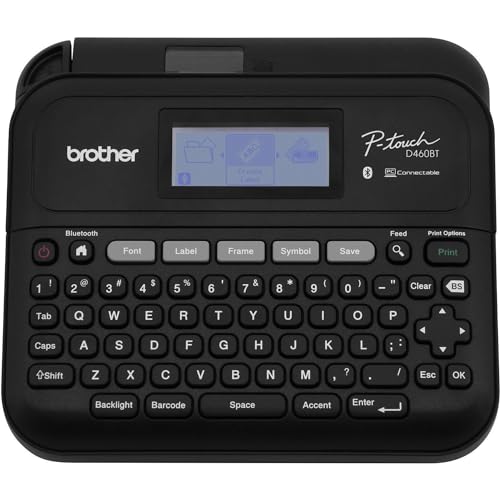
- Item Package Dimension: 12.28L x 8.89W x 3.81H inches
- Item Package Weight - 3.25 Pounds
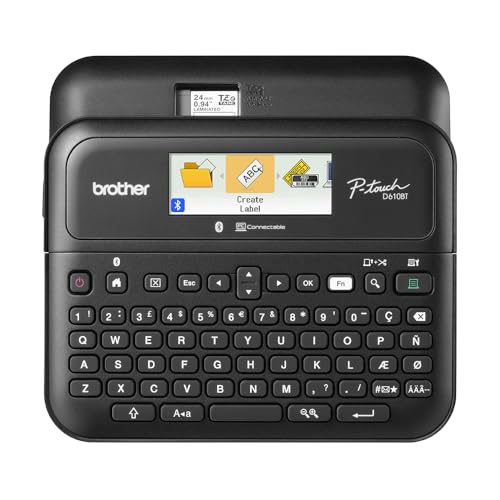
- Advanced Connectivity: Seamlessly create and print labels through Bluetooth or USB connection, enabling multiple users to design custom labels from computers or mobile devices
- Brother P-Touch Design Options: Features 17 fonts, 17 styles, 160 frames, and 900 symbols for creating eye-catching labels up to 1 in wide, with high-resolution printing
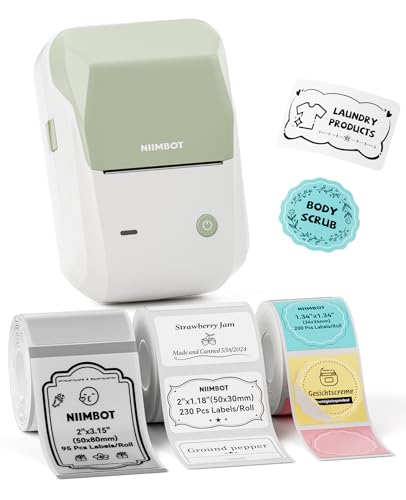
- 【You Will Get】B1 label maker with 3 rolls label paper, 2''x1.2''(50x30mm)-White/2''x3.2''(50x80mm)-Transparent/1.3''x1.3''(34x34mm)-Colorful Round, the 50x30mm white label paper
- 【Easy to Use】The B1 bluetooth label printer support iOS, Android. Download the "NIIMBOT"app, select the printer model B1 from the app, and connect printer. USB cable connection
The Problem: Why Label Printers Drop Off Bluetooth
Label printers are not headphones. They use a lean Bluetooth stack with a single-host connection model, and the pairing handshake usually lives inside the vendor's own app rather than in your phone's Bluetooth settings screen.
That design choice causes four recurring failure patterns:
- The printer is paired at the OS level but invisible in the app. This is the classic "phomemo printer not showing in app" complaint. Android and iOS grabbed the device first, and the app's scanner now skips it because the radio is occupied.
- A stale bond record. The printer remembers a key from an old phone or an old firmware version. The new handshake gets rejected without an error message.
- Denied or downgraded permissions. On Android 12 and later, Bluetooth scanning requires the Nearby Devices permission. Deny it and the app shows an empty device list forever.
- A Wi-Fi printer parked on the wrong band. Network-capable models frequently join 2.4 GHz networks only. If your phone is on the 5 GHz half of a combined SSID, discovery fails even though both devices are technically on "the same network."
Step-by-Step Solution: Fix Bluetooth Pairing in Order
Do these in sequence. Do not skip ahead — step 3 fails for a huge share of people precisely because they skipped step 2.
- Forget the printer in your phone's Bluetooth settings. Open Settings, find the printer, tap Forget This Device. Do this on every phone and tablet in the house that has ever connected to it. This single step resolves the majority of "niimbot d110 not pairing" reports.
- Hard power cycle the printer. Turn it off, remove the batteries or unplug it for a full 30 seconds, then power it back on. A soft off-button press often leaves the radio in its previous state.
- Pair from inside the vendor app, not from Settings. Open the manufacturer's app first, then run its own "add printer" or "connect device" flow. If the app finds nothing, close it fully from the app switcher and reopen it — a backgrounded scanner does not resume reliably.
- Grant every permission the app asks for. On Android that means Nearby Devices and, on some builds, Location. On iOS, check Settings and confirm the app has Bluetooth access toggled on.
- Check the consumable. Several label makers refuse to advertise or accept jobs when the tape or label roll is empty, misloaded, or the cover latch is not fully closed. Reseat the cartridge and listen for the latch.
- Charge it properly. A low battery reduces radio transmit power before it kills the printer outright. Plug it in, wait ten minutes, then retry.
- Test with one phone only. Turn Bluetooth off on every other device nearby. Single-host printers connect to whichever device wins the race, and that is often not the one in your hand.
For Wi-Fi Models: Brother QL-810W Wi-Fi Setup Problems
Wi-Fi label printers add their own failure layer. If setup stalls:
- Confirm your router's 2.4 GHz band is enabled and broadcasting. Temporarily split a merged SSID into separate 2.4 GHz and 5 GHz names if your router allows it.
- Disable client isolation or AP isolation in your router settings — it blocks phone-to-printer discovery on the same network by design.
- Turn off VPNs and private DNS on your phone during setup. Both reroute discovery traffic away from the local subnet.
- Check for a captive-portal or guest network. Printers cannot log in to one.
- If the printer supports a direct or ad-hoc mode, use it for initial configuration, then move it onto the main network afterward.
Brother P-Touch PT-D460BT Business Expert Connected Label Maker — Best for keeping a working keyboard when the app fails
The reason this model matters in a connectivity guide is structural. Its Amazon product title describes it as a connected label maker that connects and creates via Bluetooth on TZe label tapes up to approximately 3/4 inch [S3]. That phrasing points to a machine with its own onboard input, with Bluetooth as an added channel rather than the sole one. If Bluetooth pairing collapses on a phone-only printer, you have a paperweight. If it collapses here, the inference is that you can still type a label directly on the unit and keep working.
The TZe tape reference in the title matters too: TZe is Brother's laminated tape family, so consumables are a mainstream, widely stocked format rather than a proprietary one-off [S3].
Pros
- Bluetooth connectivity is stated directly in the verified product title, not inferred [S3]
- Uses TZe label tapes, a broadly available Brother consumable line [S3]
- Tape width is capped at approximately 3/4 inch per the listing, which is a known quantity before you buy [S3]
- The approximately 3/4 inch maximum tape width named in the title is a real ceiling; if you need wider shipping or shelf labels, this model cannot produce them [S3]
- The listing data available here does not state Wi-Fi support, so treat this as a Bluetooth-only connected device for planning purposes
- No published battery life, print speed, or resolution figure appears in the verified record, so those remain unknown
Brother P-Touch PT-D610BT Business Professional Connected Label Maker with Bluetooth — Best for a permanent desk position in a busy office
Brother positions this one a tier above the PT-D460BT in its own naming: the verified product title calls it the Business Professional Connected Label Maker with Bluetooth, against the PT-D460BT's Business Expert designation [S3][S4]. Reading those two titles side by side, the D610BT is the step-up model in the same connected P-touch family.
What that buys you is not stated in the data available here. Brother does not publish a tape-width ceiling in the D610BT title the way it does for the D460BT, so the honest read is that the difference is unquantified from the listing alone.
Pros
- Bluetooth is named explicitly in the verified product title [S4]
- Sits in the same connected P-touch line as the PT-D460BT, so it shares that ecosystem's app pairing path [S3][S4]
- The verified record does not publish a maximum tape width, print resolution, power source, or dimensions, so you are buying on the strength of the product line rather than on disclosed specifications [S4]
- Positioned as a business-professional unit, which typically carries a higher price than the Business Expert tier — check the current price on Amazon before assuming the step up is small
- No Wi-Fi is mentioned anywhere in the verified title, so networked multi-user printing is not something this data supports
NIIMBOT B1 Label Maker Machine with 3 Roll Tapes — Best for phone-only labelling where portability wins
The B1 is the wider sibling of the D110 that generates so many pairing complaints. Its verified product title describes a 2 inch portable printer that ships with 3 roll tapes [S5]. That 2 inch width is the headline: it is roughly double the narrow-tape format most pocket label makers use, which makes it plausible for shipping and storage-bin labels rather than just cable tags.
Be clear-eyed about the tradeoff, though. This is an app-driven printer. There is no keyboard in the product description, which means the vendor app is your only interface — and that is exactly the single point of failure this article exists to troubleshoot.
Pros
- 2 inch print width per the verified title, wider than typical pocket-format label makers [S5]
- Bundle includes 3 roll tapes, so you can print immediately without a separate consumable order [S5]
- Described as portable, which suits van, warehouse floor or craft-fair use [S5]
- App-dependent by design: if the Niimbot app will not pair, there is no onboard keyboard fallback described in the listing [S5]
- The verified record does not publish print resolution in DPI, battery capacity, or connection type, so Bluetooth support is a reasonable inference for a portable printer rather than a documented fact here
- Uses Niimbot's own roll tapes, a narrower consumable ecosystem than Brother's TZe line [S3][S5]
Tips for Best Results
- Pair once, then leave it alone. Repeatedly forgetting and re-adding a printer creates conflicting bond records.
- Keep the printer within about a metre of your phone during initial pairing, then move it once connected.
- Update the vendor app before updating the firmware, never the reverse. An old app driving new firmware is a common failure.
- If you use the printer at work, note that some corporate mobile device management profiles block unmanaged Bluetooth peripherals outright.
Common Mistakes to Avoid
- Pairing from the phone's Bluetooth settings screen first. For most label printers this is the wrong door, and it actively blocks the app from connecting.
- Assuming a visible device name means a working connection. Advertising and bonding are separate stages.
- Leaving three household devices with Bluetooth on. Single-host printers will bond with the wrong one.
- Blaming the printer when the label roll is misloaded. Check the consumable before you factory reset.
- Factory resetting too early. It wipes your saved templates and rarely fixes a bond conflict that forgetting the device would have solved.
How We Research
This website does not do product research. For this page, product facts come from Amazon Creators API verified product records retrieved on 5 September 2026, cross-read against the corresponding retailer listings for each ASIN [S3][S4][S5]. Where a specification is not present in that record — print resolution, battery life, warranty length — we say so rather than filling the gap. The troubleshooting sequence above is drawn from how Bluetooth Classic and BLE pairing works generally, not from any claim about a specific unit's behaviour. For broader consumer recourse when a device is defective out of the box, the CPSC maintains recall and safety reporting channels [S1] and USA.gov documents consumer protection options [S2].
Final Verdict
Fix the connection before you buy anything. Nine times out of ten, forgetting the device on every phone in the house and hard power cycling the printer solves it, and no purchase is required.
If the hardware really is finished, the decision splits cleanly on one question: do you want a fallback when the app fails? If yes, the Brother P-Touch PT-D460BT Business Expert Connected Label Maker is the sharper choice, because its verified title describes an on-device create-and-connect design on TZe tapes rather than an app-only one [S3]. If you need width and portability above all and accept app dependency, the NIIMBOT B1 Label Maker Machine with 3 Roll Tapes gives you a 2 inch print width and three tapes in the box [S5]. The Brother P-Touch PT-D610BT Business Professional Connected Label Maker with Bluetooth is the step-up option in the same line, but the verified record publishes no specification detail to justify the jump, so check the current price on Amazon and decide whether the tier upgrade is worth it to you [S4].
Related Resources
- Choosing between thermal and tape label makers
- Label maker tape compatibility explained
- Best portable label printers for small business
Sources & Methodology
Nobody here plugged in a label printer, paired one, or ran a print job — this website does no physical or laboratory testing, and that is worth stating plainly rather than burying. What this page rests on is a close reading of Amazon Creators API verified product records for the three ASINs above, retrieved 5 September 2026, alongside the matching retailer listings [S3][S4][S5]. For label printers specifically, that source material is genuinely informative about connection type, tape format and print width — the things that determine whether a machine will pair with your phone at all — while telling you nothing about long-term radio reliability or battery ageing, which is exactly where you should weigh owner feedback and warranty terms yourself.