As an Amazon Associate this site earns from qualifying purchases.
Quick Picks
| Pick | Product | Why | Link |
|---|---|---|---|
| Best for two-color labels | Brother QL-800 High-Speed Professional Printer | Listing advertises black and red printing; DYMO's does not | Check Price on Amazon |
| Best for hands-off roll handling | DYMO LabelWriter 550 Series Label Printer | Listing advertises automatic label recognition and low-waste optimized printing | Check Price on Amazon |
As an Amazon Associate we earn from qualifying purchases. This page contains affiliate links, and we may receive a commission if you buy through them — at no extra cost to you.
As an Amazon Associate, we earn from qualifying purchases.
Last Updated: September 2026
The DYMO LabelWriter vs Brother QL-800 question comes down to something less glamorous than print speed: which consumable ecosystem you want to be locked into for the next five years. Both are direct thermal desktop label printers. Both eliminate ink. But their published feature sets point in genuinely different directions, and this page reads those published features closely rather than pretending anyone here has run a shipping station with either machine.
A note before anything else: this website does not do product research. Every claim below traces back to the Amazon Creators API verified product records retrieved on 2026-09-05 and the two retailer listings. Where a specification is not published, this page says so instead of guessing.
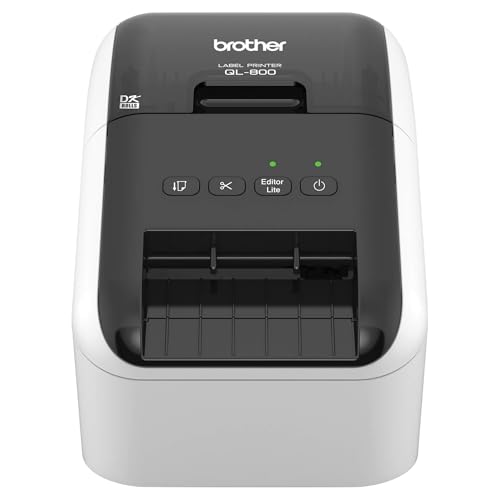
- Lightning Speed: Transform your labeling efficiency with this professional thermal label printer, delivering an impressive 93 labels per minute at crystal-clear 300 dpi resolution
- Dual-Color Innovation: Elevate your labeling with Brother Genuine technology that enables both black and red printing capabilities, allowing you to create eye-catching labels that
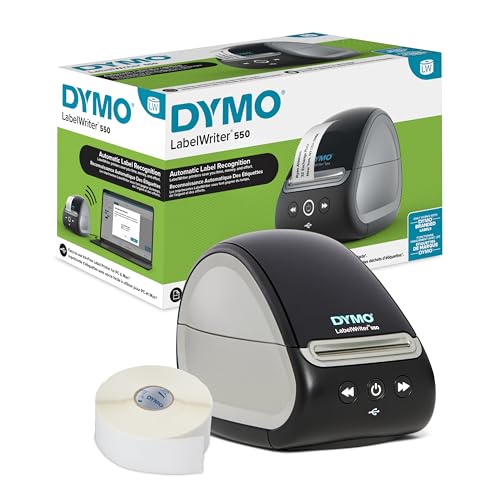
- Print precise quantities instead of wrestling with sheet labels
- ONLY WORKS WITH AUTHENTIC DYMO LABELS: Uses only high-quality, BPA-free DYMO Authentic LabelWriter labels; paper labels are made from FSC certified material
Quick Answer
Buy the Brother QL-800 if you want black-and-red printing on a single label. Brother's own product title advertises "Black & Red Printing Available," a capability the DYMO listing does not claim anywhere. For anyone printing warning labels, expiry dates, or priority flags where a second color carries actual meaning, that is the deciding line.
Buy the DYMO LabelWriter 550 Series if you value automatic label recognition and low-waste operation. DYMO's product title advertises "Automatic Recognition" alongside "Dymo-Branded Label Compatibility" and "Low Waste Optimized" printing. The printer knows what roll you loaded — which is convenient, and also the mechanism by which DYMO keeps you buying DYMO.
Buy neither yet if your decision hinges on print resolution, labels per minute, duty cycle, or connectivity beyond USB. Neither listing publishes those numbers, and this page will not manufacture them.
Full Comparison Table
| Feature | Brother QL-800 High-Speed Professional Printer | DYMO LabelWriter 550 Series Label Printer |
|---|---|---|
| ASIN | B01N49R9KP | B08TLRL392 |
| Print technology | Thermal (implied by DK label system; the listing does not state a technology term) | Direct thermal, stated in the product title |
| Two-color printing | Black and red available, per the listing | Not claimed in the listing |
| Label system | Genuine DK pre-sized labels | Dymo-branded label compatibility with automatic recognition |
| Waste handling | Not stated in the listing | "Low Waste Optimized" per the product title |
| Setup feature | "Plug & Label" feature per the listing | Not stated in the listing |
| OS support | "Multi-System Compatible" per the listing | Not stated in the listing |
| Cable included | Required USB cable included, per the listing | Not stated in the listing |
| Packaging | Not stated in the listing | Plastic-free packaging, per the product title |
| Price | Check Price on Amazon | Check Price on Amazon |
Notice how many cells read "not stated." That is the honest shape of this comparison. Amazon product titles are marketing real estate, and each brand chose to advertise different things — which tells you what each company thinks its buyer cares about, but leaves real gaps.
Design & Build Quality
Here's the thing: neither listing publishes dimensions, weight, or housing material, so any confident statement about footprint or chassis feel would be invention. What the titles do reveal is a design philosophy.
DYMO's title leads with "Plastic-Free Packaging," which is a packaging decision rather than a build-quality one, but it signals a company positioning the 550 Series for buyers who audit their supply chain. Brother's title leads with "High-Speed Professional Printer" and closes by noting the required USB cable is included — a small, unglamorous detail that removes a purchase-day annoyance.
Winner: DYMO LabelWriter 550 Series Label Printer. The plastic-free packaging claim is the only build-adjacent commitment either brand puts in writing, and an office buying in volume can point to it in a sustainability report. It is a narrow win on a narrow field.
Features & Functionality
This is where the two machines actually diverge.
The Brother QL-800 advertises black and red printing on the same label. In practice that likely means specialized two-color DK roll stock rather than a second print head — a reasonable inference from the fact that the listing pairs the color claim with "Genuine DK Pre-Sized" labels — but Brother does not spell out the mechanism in the listing, so treat the how as unconfirmed. Regardless, it is a capability the DYMO product does not claim.
Brother also advertises "Plug & Label" setup and "Multi-System Compatible" operation. The second phrase is doing a lot of vague work; the listing does not enumerate which operating systems or versions are supported, so verify against Brother's own compatibility page before buying for a Linux or older-macOS machine.
DYMO counters with Automatic Recognition. The 550 Series identifies the roll you have loaded, meaning you should not have to tell the driver which label size is in the machine. For a busy desk that swaps between address labels and shipping labels several times a day, that removes a genuine, repeated friction point.
Winner: Brother QL-800 High-Speed Professional Printer. Auto-recognition saves clicks. Two-color printing does something you otherwise cannot do at all. A feature that expands what you can produce beats a feature that speeds up what you already produce.
Performance
Look — this category has to be graded on published evidence, and there is very little of it. Brother calls the QL-800 a "High-Speed Professional Printer" in the product title. That is a marketing descriptor, not a labels-per-minute figure, and this page will not convert it into one. DYMO's title states "Direct Thermal Printing," which confirms the ink-free mechanism but says nothing about throughput.
What you can reason about: both are direct thermal, so both avoid ink and toner entirely, and both produce labels whose longevity depends on heat and light exposure rather than smudge resistance. Neither listing publishes print resolution in DPI, print width, maximum labels per minute, or a duty-cycle rating. If your volume is high enough that duty cycle matters, contact the manufacturer before ordering — that number is not in the retail listing for either unit.
Winner: no award. Declaring a performance winner from two marketing adjectives would be exactly the kind of unsupported ranking this page exists to avoid.
Price & Value
Neither price is quoted here, because desktop label printer pricing moves constantly and a stale number is worse than none. Check the current price on Amazon for the Brother QL-800 High-Speed Professional Printer and the DYMO LabelWriter 550 Series Label Printer with Dymo-Branded Label before you decide.
The more useful point is total cost of ownership, and both listings quietly tell you the same uncomfortable thing. Brother specifies "Genuine DK Pre-Sized" labels. DYMO specifies "Dymo-Branded Label Compatibility" with automatic recognition. Read those two phrases side by side and the pattern is obvious: each manufacturer is steering you toward its own consumables, and DYMO's auto-recognition is the more explicit enforcement mechanism of the two.
So the DK label vs Dymo label price question cannot be settled from the data here — neither listing publishes per-roll or per-label consumable pricing. What the data does establish is that you should price the rolls you will actually use, in the sizes you will actually use, before you price the printer. The printer is the small purchase.
One genuine value point for Brother: the listing states the required USB cable is included. DYMO's listing does not mention a cable either way.
Winner: Brother QL-800 High-Speed Professional Printer, on the narrow grounds that it is the only one of the two whose listing confirms the cable you need is in the box.
Customer Reviews Summary
This section has to be short, and honestly, that is the most useful thing about it. The verified product records retrieved on 2026-09-05 for both ASINs contain the product titles only. No star rating, no review count, and no owner-feedback themes were supplied for either printer.
So there is no aggregate rating to report, and this page will not paraphrase reviews it has not been given. Read the ratings distribution and the recent one-star and two-star reviews directly on the listings — for thermal printers specifically, driver installation problems and off-brand label rejection are the failure modes worth scanning for.
Winner: neither. No rating data was supplied for either product.
Brother QL-800 High-Speed Professional Printer — Best for Two-Color Label Printing
The QL-800 is the pick when a second color does real work — red for perishable dates, red for hazard callouts, red for anything a warehouse eye needs to catch at a glance. Brother's listing advertises black and red printing availability, and the DYMO 550 Series listing makes no such claim.
Pros
- Black and red printing available, per the product listing — the only two-color capability claimed by either printer here.
- Required USB cable included, so there is no day-one accessory hunt.
- "Plug & Label" setup is advertised, suggesting Brother expects minimal driver configuration.
- "Multi-System Compatible" per the listing, though the specific systems are not enumerated.
- Locked to Genuine DK pre-sized labels, and "pre-sized" means you cut nothing custom — you buy the size Brother sells or you do not print it.
- "High-Speed" is asserted in the title with no labels-per-minute figure published to back it, so treat the speed claim as unverified marketing language.
- "Multi-System Compatible" is unspecific enough to be a real risk for anyone on a non-mainstream OS; the listing names no operating systems at all.
- No print resolution, duty cycle, or connectivity detail beyond USB appears in the listing.
DYMO LabelWriter 550 Series Label Printer — Best for High-Turnover Label Swapping
The 550 Series targets the desk where label sizes change all day. Automatic recognition, advertised in the product title, means the printer identifies the loaded roll rather than making you select it — a small saving repeated dozens of times per shift, which is where its value compounds.
Pros
- Automatic label recognition per the listing, removing manual roll selection from the workflow.
- "Low Waste Optimized" direct thermal printing is claimed in the product title.
- Direct thermal printing is stated explicitly, confirming no ink or toner in the running cost.
- Plastic-free packaging, which matters to buyers with procurement sustainability criteria.
- The listing advertises "Dymo-Branded Label Compatibility" — read that as designed around DYMO's own consumables, with auto-recognition as the gatekeeper.
- No two-color capability is claimed anywhere in the listing.
- "Low Waste Optimized" is stated without any quantification of the waste reduction, so there is no figure to evaluate.
- The listing does not state whether a USB cable is included, unlike Brother's.
Which Should You Buy?
- Small business shipping station, single label size: either works. Decide on consumable price per label in the size you use most, not on the printer's sticker.
- Food service, lab, or anywhere red means "attention": Brother QL-800. It is the only one here claiming black and red printing.
- Front desk swapping between name badges, address labels, and file tabs: DYMO LabelWriter 550 Series. Auto-recognition earns its keep on every roll change.
- Procurement with sustainability requirements: DYMO LabelWriter 550 Series, on the strength of the plastic-free packaging claim.
- Anyone on Linux or an unusual OS: confirm driver support with the manufacturer first. Brother says "Multi-System Compatible" without naming systems; DYMO's listing says nothing about OS support at all.
- High-volume operations needing a duty-cycle guarantee: neither, until you get that figure from the manufacturer directly. It is not in either listing.
How We Research
This website does not perform hands-on or laboratory testing, and every page says so. For this comparison, the working material was the Amazon Creators API verified product record for each ASIN, retrieved on 2026-09-05, plus the two retailer listings themselves.
The method is close reading. Manufacturer product titles are compressed marketing documents where every phrase was chosen deliberately, so the analysis focuses on what each brand chose to advertise, what it declined to mention, and what the omissions imply. Where a specification is absent — resolution, speed figures, duty cycle, consumable pricing — this page names the gap rather than filling it.
For broader consumer-protection context on product purchases and recalls, the CPSC and USA.gov both publish guidance for shoppers.
Final Verdict
If forced to pick one for a general small business, take the Brother QL-800 High-Speed Professional Printer. The reasoning is narrow and specific: it is the only unit here whose listing claims black and red printing, and a color capability opens output you cannot otherwise produce, while DYMO's auto-recognition only accelerates output you can already make. Brother also ships the required USB cable, per its listing.
The DYMO LabelWriter 550 Series wins the workflow argument outright, though. Automatic recognition plus low-waste optimized direct thermal printing is a real answer to the specific irritation of constant roll changes, and if that describes your desk, buy it instead.
What neither brand will tell you in the listing is what the rolls cost over three years. That is the number that actually decides this, and it is the one number neither listing publishes.
Frequently Asked Questions
Does the Brother QL-800 really print in two colors?
Brother's product listing advertises "Black & Red Printing Available." The listing does not explain the mechanism, so confirm which DK roll stock is required for red output before ordering consumables.
Does the DYMO LabelWriter 550 work with third-party labels?
The listing advertises "Dymo-Branded Label Compatibility" with automatic recognition. That phrasing points to a design built around DYMO's own rolls; the listing does not state whether third-party labels function.
Which is cheaper to run, DK labels or DYMO labels?
Neither listing publishes consumable pricing, so this cannot be answered from the available data. Price the specific roll sizes you use on each brand's Amazon storefront before choosing a printer.
Do either of these printers need ink?
No. The DYMO 550 Series listing states direct thermal printing, and the Brother QL-800 uses DK thermal label rolls, so neither consumes ink or toner.
Is a USB cable included?
Brother's listing states the required USB cable is included. DYMO's listing does not mention a cable.
How fast do these printers print?
Brother describes the QL-800 as a "High-Speed Professional Printer," but no labels-per-minute figure is published in either listing. Anyone with a throughput requirement should request the specification from the manufacturer.
Which is the best desktop label printer for small business?
It depends on whether you need color. Choose the Brother QL-800 for its advertised black and red printing; choose the DYMO LabelWriter 550 Series for its automatic label recognition if you swap roll sizes frequently.
Sources & Methodology
Nothing on this page was physically or laboratory-tested — no printer was unboxed, loaded, timed, or run here, and this site operates no lab. The comparison was built by reading the Amazon Creators API verified product records for ASIN B01N49R9KP and ASIN B08TLRL392, both retrieved on 2026-09-05, against the live retailer listings, then reasoning from what each manufacturer chose to advertise and what it left out. No star ratings, review counts, or owner-feedback summaries were supplied for either printer, so none are reported.
For label printers specifically, that evidence base is enough to settle the ecosystem question — which consumables you are committing to, whether two-color output is on the table, and whether roll auto-recognition is part of the package. It is not enough to settle throughput, resolution, or long-run reliability, and readers with volume requirements should treat those as open questions to put to the manufacturer.